
Remote Admin For Minecraft (F)2.121 - Get APK
You'll be able to download in few seconds.
Publisher Description
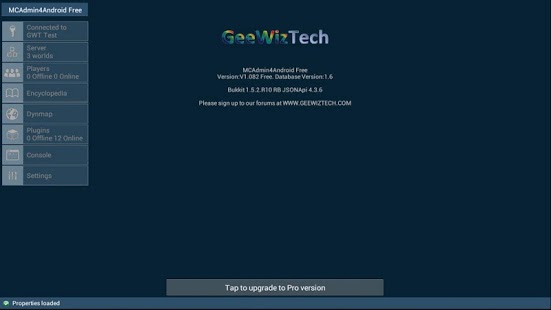
Remote Minecraft management for android.
Manage your Minecraft servers using any android device with this handy app !
The application allows admins of JSONapi enabled servers or servers using the McMyAdmin wrapper to control and interact with their Minecraft servers on any android V3 and above devices.
Please note this is the free version, some Pro features are unavailable.
Optimise for either tablet or handset layouts
Manage multiple server connections via JSONApi and/or McMyadmin
View current server details
View online and offline server players
Change players server roles (OP/Whitelist/Banned/Game mode)
Inspect and interact with players inventory
View Dynmap (if installed/running)
Interactive Chat and Console (Pro version)
Calladmin command and chat notifications
Minecraft item Database
Support and a full list of features for this application can be found at WWW.GEEWIZTECH.COM.
Feel free to join our test server at minecraft.geewiztech.com
JSONApi infomation and links at http://dev.bukkit.org/server-mods/jsonapi/
McMyAdmin information at http://www.mcmyadmin.com/
Minecraft is a trademark of Mojang, we do not claim to own, nor do we own any part of it.
About Remote Admin For Minecraft (F)
The company that develops Remote Admin For Minecraft (F) is GeeWizTech. The latest version released by its developer is 2.121.
To install Remote Admin For Minecraft (F) on your Android device, just click the green Continue To App button above to start the installation process. The app is listed on our website since 2014-06-23 and was downloaded 0 times. We have already checked if the download link is safe, however for your own protection we recommend that you scan the downloaded app with your antivirus. Your antivirus may detect the Remote Admin For Minecraft (F) as malware as malware if the download link to com.geewiztech.mcadmin4androidFree is broken.
How to install Remote Admin For Minecraft (F) on your Android device:
- Click on the Continue To App button on our website. This will redirect you to Google Play.
- Once the Remote Admin For Minecraft (F) is shown in the Google Play listing of your Android device, you can start its download and installation. Tap on the Install button located below the search bar and to the right of the app icon.
- A pop-up window with the permissions required by Remote Admin For Minecraft (F) will be shown. Click on Accept to continue the process.
- Remote Admin For Minecraft (F) will be downloaded onto your device, displaying a progress. Once the download completes, the installation will start and you'll get a notification after the installation is finished.
Program Details
System requirements
Download information
Pricing
Version History
version 2.121
posted on 2014-06-23
Most McMyAdmin functions are now active, such as,All Server Config Settings,Full Backup control (Create/Restore/Delete),Server stats - CPU and Memory usage etc. in (near) real-time.,McMyAdmin Group and Permissions control added (Beta, still a work in progress),JSONApi Multi-Request fully added for a faster experience.,Lots of minor enhancements to both the Handset version and the Tablet version.
version V1.070
posted on 2013-06-27
Several fixes and updates
Disclaimer
External Download
We do not host Remote Admin For Minecraft (F) on our servers. We did not scan it for viruses, adware, spyware or other type of malware. This app is hosted by Galad and passed their terms and conditions to be listed there. We recommend caution when installing it.
The APK Download link for Remote Admin For Minecraft (F) is provided to you by apps112.com without any warranties, representations or guarantees of any kind, so access it at your own risk.
If you have questions regarding this particular app contact the publisher directly. For questions about the functionalities of apps112.com contact us.
